
Some file types are really just zipped (or maybe gzipped) folders containing xml and/or other plaintext based files.
For example
- *.epub e-books
- OpenDocument files
- Java source jar files
- JEE web application archives (*.war)
- Pentaho report files (*.prpt)
If you happen to have such files in a software project, and don’t want to treat them like opaque binary blobs, you need a tool that helps you to transparently unzip, act on and rezip them. Also you probably want to be able to diff them without resorting to commercial tools like BeyondCompare.
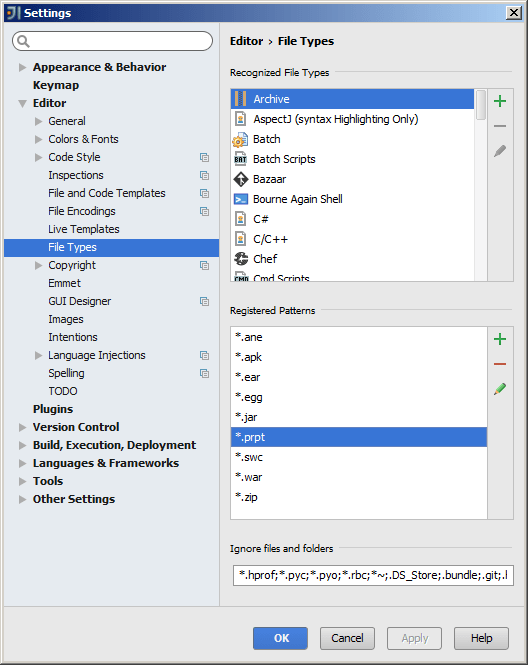
IntelliJ CE (Community Edition) supports archive diffs as part of its regular Comparing Files functionality. All you need to do is make sure the file extension of the file types you want to be treated as archives are accordingly registered in Settings – Editor – File Types.
The screenshot below shows *.war and *.jar registered as Archive file name patterns (by default) and *.prpt (Pentaho report files) as an example of a manually added pattern:


 Oleander Donovan's IT blog