Some pure CSS buttons

Do you still use gifs or other pixel graphics for buttons on web pages? I hope not. CSS3 support is available in all modern browsers, so rounded corners, gradients, shadows, etc are no problem.

See this jsfiddle for the CSS class definitions and a minimal HTML sample.

Without box shadow:

Oliver Doepner

Oliver Doepner

Oliver Doepner

With box shadow:

Oliver Doepner

Oliver Doepner

Oliver Doepner

OpenJDK builds for Windows now available from Redhat

As I mentioned in an earlier post, officially supported OpenJDK builds for non-Linux platforms have been notoriously hard to come by in the past, at least until Azul started their Zulu builds in 2013. Unofficial community builds are also available from the ojdkbuild project on Github.

Today Redhat announced that their OpenJDK offerings now include builds for the Windows platform as well.

After Google decided to use OpenJDK in Android N, I guess this is another strong indicator of OpenJDK’s value and increasingly wide adoption.

JEE Guardians petition Oracle to actively work on Enterprise Java standards again

Over the last 6 months or so, the development on Java EE 8 JSRs led by Oracle has nearly come to a stand-still. Even some spec leads working for Oracle privately admitted that they cannot do their part because Oracle has given them other priorities.

That is why the JEE Guardians group was formed by the community and that’s why I just signed this petition: “Larry Ellison: Tell Oracle to Move Forward Java EE as a Critical Part of the Global IT Industry

If you care about the future of Enterprise Java, please get involved and sign the petition, too.

Retrieve “last modified” timestamp of web resource in UTC seconds

This command line assumes that “${url}” is the URL of the web resource:

curl -s -I "${url}" | grep 'Last-Modified:' | cut -c 16- | date -f - +'%s'

It can be useful to check the freshness of a download URL before a GET request.

You could compare the result to the last-modified timestamp of a local file and only download the remote file if it is newer than the existing local one.

Compare two Tomcat installations using rsync

Lets assume you manage multiple servers that host Java web applications using the Tomcat web server.

To quickly compare the Tomcat installations on host1 and host2, we can use the “dry-run” mode of the rsync command.

In the following example, we assume that you have ssh access to both of your Tomcat hosts, the installations are in /opt/tomcat and the “tomcat” system user has read access to all relevant files and directories of the installation:

ssh tomcat@host1
rsync --archive --checksum --dry-run --verbose --delete \
      --exclude temp --exclude work --exclude logs --exclude webapps \
      /opt/tomcat/ tomcat@host2:/opt/tomcat/

This will list

  • All files that differ in checksum
  • All files that only exist on host2 (look for ‘deleting [filename]’)

Run the same commands with host1 and host2 switched, to also see the files that only exist on host1.

We excluded the temp, work and logs directories because they are variable in nature.
We also excluded the webapps directory because we only wanted to compare the base installation.

Spotify on Debian GNU/Linux in Canada

Today I decided to try out the free ad-sponsored Spotify music streaming service. It has been available in Canada since September 2014.

After signing up you can immediately use the flash-based web player at play.spotify.com.

Installing the client app

Alternatively you can download and install the Spotify client app. I cannot say yet what the advantages or disadvantages are, maybe reading this article can be helpful.

Anyway, if you want to try the client app, for Debian (or Ubuntu) users it works like this:

  1. Add the repo key (to verify downloaded packages)
  2. Add the spotify repo to apt sources
  3. Update apt caches
  4. Install the spotify client

Here are the shell commands (requires sudo):

sudo apt-key adv --keyserver hkp://keyserver.ubuntu.com:80 --recv-keys BBEBDCB318AD50EC6865090613B00F1FD2C19886
echo deb http://repository.spotify.com stable non-free | sudo tee /etc/apt/sources.list.d/spotify.list
sudo apt-get update
sudo apt-get install spotify-client

After successful installation you will find a “Spotify” entry in the “Multimedia” section of your start menu.

Using your Facebook login

If you use your Facebook account to sign into Spotify you will probably see this question:

Spotify would like to post to Facebook for you.
Who do you want to share these posts with?

It is safe to choose “Not Now” which prevents Spotify from posting to your timeline. The login will still work.

If your are using the downloaded stand-alone client app and the Facebook login fails with an error page, then simply enter the email address and password from your Facebook account into the login fields of the Spotify client app.

Spotify says that it only uses these credentials to pass through to the Facebook authentication and won’t store your password anywhere. I hope that’s true.

Decorate your thoughts my dear : Unicode 8 supports 1051 Emojis

unicode-monkey-face Have you noticed how email subjects, chat messages and other traditional “plain text” content more and more often contains smileys, ideograms, pictograms and other funny symbols?

For example, you can probably see the faces of mouse, bull, cat and monkey right here: 🐭 🐮 🐱 🐵

These expressive tiny pictures are also known as Emojis and can be seamlessly mixed into the letters, numbers, punctuation marks and few traditional “special characters” that most of us know from the computer (or even typewriter?) keyboard.

This is possible because on todays digital devices all of us, whether we know it or not, use an international standard called Unicode that supports all letters and symbols from all official languages and writing systems on our planet (and even Klingon, by the way). And as an extensible standard, Unicode keeps growing and recent versions have increasingly incorporated non-alphanumeric symbols.

For example, there is a whole Unicode block of smileys and cat faces that was added in Unicode version 8 to incorporate a set of symbols that Japanese mobile carriers had already added to the Shift JIS character encoding: 😀 😁 😂 😃 😄 😅 😆 😇 😈 😉 😊 😋 😌 😍 😎 😏 😐 😑 😒 😓 😔 😕 😖 😗 😘 😙 😚 😛 😜 😝 😞 😟 😠 😡 😢 😣 😥 😦 😧 😨 😩 😪 😫 😭 😮 😯 😰 😱 😲 😳 😴 😵 😶 😷 😸 😹 😺 😻 😼 😽 😾 😿 🙀

With the now ubiquituous support of Unicode by computer operating systems, internet services and mobile devices, we are no longer limited to the 90° tilted “ASCII emoticons” using character sequences like :^). With Unicode we can use emojis as single symbols of their own right.

This leads to the question how to enter emojis using your keyboard, be it a physical computer keyboard or through the on-screen touch keyboards on your modern mobile devices. It is possible, with varying degrees of convenience on Apple, Android, Windows or Mac computers and many other devices.

Unfortunately, UI level emoji support on GNU/Linux systems is practically non-existent which effectively limits Linux users to copy/paste from “cheatsheets” or the official Unicode 8 charts with their 1051 emoji and symbol codepoints.

One tip for Debian based systems: Make sure to have the Droid and Symbola fonts installed:

sudo apt-get install ttf-ancient-fonts fonts-droid

Then you can write a chess game for the text console using these Unicode glyphs from the “Miscellaneous Symbols” Unicode block: ♔ ♕ ♖ ♗ ♘ ♙ ♚ ♛ ♜ ♝ ♞ ♟

Or roll the dice: ⚀ ⚁ ⚂ ⚃ ⚄ ⚅

PS: All characters in this blog post are ok to recycle ☺ : ♲ ♳ ♴ ♵ ♶ ♷ ♸ ♹ ♺ ♻ ♼ ♽

As always, please feel free to respond in the comments section below.

JVM tips – The G1 Garbage Collector

An old wisdom says that Software can be optimized for latency, throughput or footprint. The same is true for the JVM and its Garbage Collector(s).

Roughly speaking, the classic GC implementations each optimize for one aspect: Serial GC optimizes footprint, Parallel GC optimizes throughput and Concurrent Mark and Sweep (CMS) optimizes for response times and minimal GC induced latency.

But since JDK7u4, we officially have the “Garbage First” (G1) GC. It is still new enough to not even have its own Wikipedia article, but there are good introductory tutorials, articles and tuning guides.

In several ways, G1 is a step up from the conventional GC approaches: It uses non-contiguous heap regions instead of contiguous young and old generations and does most of its reclamation through copying of the live data, thus achieving compaction.

It is based on the principle of collecting the most garbage first and designed with scalability in mind, without compromising throughput.

The benefits of G1 have lead to a proposal and lively debate about Defaulting to G1 Garbage Collector in Java 9.

In conclusion, you can either take the easy path and use the default JVM settings or take some time to learn about modern GC choices and tuning options.

And if you get it all right you might be rewarded with your Java based services performing better than ever before … :)

DBeaver – My new favorite DB tool

I have used Toad for Oracle and Oracle SQL Developer. Those are both good for working with Oracle databases.

However, I generally prefer Open Source tools and ideally something that works with other databases as well.

So I looked around, tried TOra but found it buggy and too limited. Also, its development is quite slow, see commit history.

Then I came across DBeaver and liked it a lot. It is actively developed, the latest version 3.5.1 was actually released 3 days ago.

It is a cross-platform tool (Windows, Linux, MacOS, other Unixes) written in Java, uses the Eclipse framework for a lot of great out-of-the-box features and is overall quite polished.

It supports many databases via JDBC. More details and some comparison with similar tools are mentioned on its About page.

splashscreen-circle

Diff zipped files in Intellij using “Archive” file type

Some file types are really just zipped (or maybe gzipped) folders containing xml and/or other plaintext based files.

For example

  • *.epub e-books
  • OpenDocument files
  • Java source jar files
  • JEE web application archives (*.war)
  • Pentaho report files (*.prpt)

If you happen to have such files in a software project, and don’t want to treat them like opaque binary blobs, you need a tool that helps you to transparently unzip, act on and rezip them. Also you probably want to be able to diff them without resorting to commercial tools like BeyondCompare.

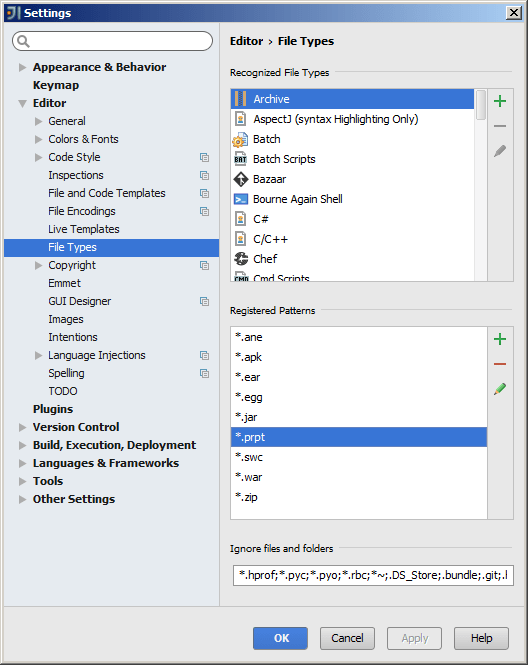
IntelliJ CE (Community Edition) supports archive diffs as part of its regular Comparing Files functionality. All you need to do is make sure the file extension of the file types you want to be treated as archives are accordingly registered in Settings – Editor – File Types.

The screenshot below shows *.war and *.jar registered as Archive file name patterns (by default) and *.prpt (Pentaho report files) as an example of a manually added pattern:

intellij_register-pentaho-prpt-as-archive-file-type