JVM tips – The G1 Garbage Collector

An old wisdom says that Software can be optimized for latency, throughput or footprint. The same is true for the JVM and its Garbage Collector(s).

Roughly speaking, the classic GC implementations each optimize for one aspect: Serial GC optimizes footprint, Parallel GC optimizes throughput and Concurrent Mark and Sweep (CMS) optimizes for response times and minimal GC induced latency.

But since JDK7u4, we officially have the “Garbage First” (G1) GC. It is still new enough to not even have its own Wikipedia article, but there are good introductory tutorials, articles and tuning guides.

In several ways, G1 is a step up from the conventional GC approaches: It uses non-contiguous heap regions instead of contiguous young and old generations and does most of its reclamation through copying of the live data, thus achieving compaction.

It is based on the principle of collecting the most garbage first and designed with scalability in mind, without compromising throughput.

The benefits of G1 have lead to a proposal and lively debate about Defaulting to G1 Garbage Collector in Java 9.

In conclusion, you can either take the easy path and use the default JVM settings or take some time to learn about modern GC choices and tuning options.

And if you get it all right you might be rewarded with your Java based services performing better than ever before … :)

DBeaver – My new favorite DB tool

I have used Toad for Oracle and Oracle SQL Developer. Those are both good for working with Oracle databases.

However, I generally prefer Open Source tools and ideally something that works with other databases as well.

So I looked around, tried TOra but found it buggy and too limited. Also, its development is quite slow, see commit history.

Then I came across DBeaver and liked it a lot. It is actively developed, the latest version 3.5.1 was actually released 3 days ago.

It is a cross-platform tool (Windows, Linux, MacOS, other Unixes) written in Java, uses the Eclipse framework for a lot of great out-of-the-box features and is overall quite polished.

It supports many databases via JDBC. More details and some comparison with similar tools are mentioned on its About page.

splashscreen-circle

Diff zipped files in Intellij using “Archive” file type

Some file types are really just zipped (or maybe gzipped) folders containing xml and/or other plaintext based files.

For example

  • *.epub e-books
  • OpenDocument files
  • Java source jar files
  • JEE web application archives (*.war)
  • Pentaho report files (*.prpt)

If you happen to have such files in a software project, and don’t want to treat them like opaque binary blobs, you need a tool that helps you to transparently unzip, act on and rezip them. Also you probably want to be able to diff them without resorting to commercial tools like BeyondCompare.

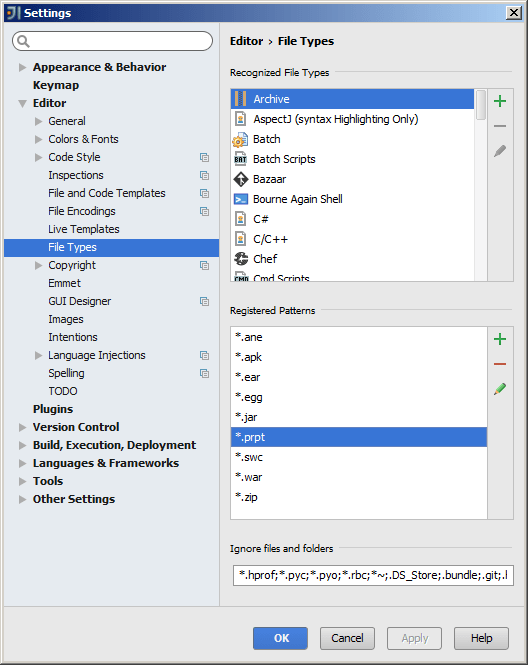
IntelliJ CE (Community Edition) supports archive diffs as part of its regular Comparing Files functionality. All you need to do is make sure the file extension of the file types you want to be treated as archives are accordingly registered in Settings – Editor – File Types.

The screenshot below shows *.war and *.jar registered as Archive file name patterns (by default) and *.prpt (Pentaho report files) as an example of a manually added pattern:

intellij_register-pentaho-prpt-as-archive-file-type

Set the X cursor theme in XFCE 4.10

After upgrading to Debian Jessie and XFCE 4.10, I set the default cursor theme in XFCE main menu – Settings – Mouse and Touchpad – Theme tab.

But this seemed to affect only a few applications.

To consistently set the theme for all applications and the desktop I had to run this:

oliver@debian:~$ sudo update-alternatives --config x-cursor-theme
There are 3 choices for the alternative x-cursor-theme (providing /usr/share/icons/default/index.theme).

  Selection    Path                                    Priority   Status
------------------------------------------------------------
  0            /usr/share/icons/Adwaita/cursor.theme     90        auto mode
  1            /usr/share/icons/Adwaita/cursor.theme     90        manual mode
  2            /usr/share/icons/DMZ-Black/cursor.theme   30        manual mode
* 3            /usr/share/icons/DMZ-White/cursor.theme   50        manual mode

Press enter to keep the current choice[*], or type selection number:

Select the desired theme from the listed options and make sure it is the same as the one you selected in the XFCE settings.

Configure Intellij to use default Eclipse Java import layout

Eclipse and Intellij use different default layouts of Java imports. If used on the same project, Eclipse’s “Organize Imports” will compete with Intellij’s “Optimize Imports“.

To avoid distracting back-and-forth code changes, Intellij can be configured to match the default Eclipse behavior:

Go to File – Settings – Editor – Code Style – Java – Imports tab

Prevent on-demand imports (i.e. wildcards) by settings high count limits:
intellij-java-imports-no-wildcards

Define the imports layout (i.e. grouping and order) like this:
intellij-java-imports-layout

Fix Eclipse installation after Cygwin unzip

I used Cygwin’s unzip on Windows 7 to unpack freshly downloaded Eclipse zip packages. When trying to start eclipse.exe, I was getting weird error messages:

For Luna (4.4):

eclipse-luna-error-after-cygwin-unzip

For Mars (4.5):

eclipse-mars-error-after-cygwin-unzip

It turned out that after unzipping, the executable permission was not set on ‘exe’ and ‘dll’ files, so I had to fix it like this:

find eclipse \( -name '*.dll' -or -name '*.exe' \) -exec chmod +x {} \;

Zulu – Certified OpenJDK 8 builds for all operating systems

You might have heard that Java is Open Source. And then you noticed that the Java SE downloads from the Oracle website are not actually Open Source. Maybe you also heard about OpenJDK.

So how does this fit together?

OpenJDK is an Open Source implementation of Java and Oracle Java engineers do work on Java with the OpenJDK community and and within the OpenJDK projects.

But source code needs to be compiled into executable binaries to be useful for end users. And that’s where things get dicey …

Where to find OpenJDK builds

For a long time there has been no reliable source for certified, well-supported builds of OpenJDK for all platforms.

The various GNU/Linux distributions, like Fedora, Debian, etc, have provided OpenJDK builds for a quite a while now, but for Windows and MacOS there were only some unofficial, often outdated hobby projects without reliable security updates.

Zulu – Open JDK builds

zulu-duke

This changed within the last 2 years: JVM vendor Azul Systems first released their “Zulu” line of free OpenJDK builds in September 2013, mainly targeting Windows Servers and the Microsoft Azure cloud. In 2014 they added support for Linux, MacOS and Java 8, as well as Docker images. All Zulu builds are certified against the official Java SE TCK. The focus is on the JDK and servers, without browser plugin or webstart.

The Azul website does not clearly state their security update policy for their free builds, but they offer deb and rpm package repositories that seem to contain latest builds of OpenJDK that match the current Oracle JDK update versions. Also, their engineers participate in the community and allegedly contribute back to OpenJDK.

Zulu – OpenJDK 8 for Debian stable

For Debian stable (Wheezy or Jessie), Azul is a convenient way to install OpenJDK 8, since the Debian openjdk-8 package is currently only available in Debian unstable and hasn’t even made it into the Debian testing yet.

Here is how I set up the Azul deb repo and installed their OpenJDK 8:

sudo apt-key adv --keyserver hkp://keyserver.ubuntu.com:80 --recv-keys 0x219BD9C9
apt_source='deb http://repos.azulsystems.com/debian stable main'
apt_list='/etc/apt/sources.list.d/zulu.list'
echo "$apt_source" | sudo tee "$apt_list" > /dev/null
sudo apt-get update
sudo apt-get install zulu-8

Please note, that the package installation automatically sets the Java related system alternatives to the Zulu ones. So right after zulu-8 installation the java version in your system path will be something like this:

oliver@basement:~$ java -version
openjdk version "1.8.0_45"
OpenJDK Runtime Environment (Zulu 8.7.0.5-linux64) (build 1.8.0_45-b14)
OpenJDK 64-Bit Server VM (Zulu 8.7.0.5-linux64) (build 25.45-b02, mixed mode)

Viewport meta tag for better page rank in mobile Google search

Algorithm changes are rolled out to Google’s data centres to let mobile-friendly web pages get higher ranking on Google Search. Some sensationalist news outlets call this “mobilegeddon“. I think it is much ado about very little.

Google provides a mobile-friendly test and at first odoepner.github.io did not pass.

So I learned about the viewport meta tag and after adding the following to the head section of my html pages they now pass the test:

<meta name="viewport" 
      content="width=device-width, initial-scale=1.0, user-scalable=yes"/>

About the viewport meta tag

180x130_viewport-meta-tag

The “viewport” meta tag is not part of the official HTML standard, but the validator at the W3C will still accept your pages as valid.

The tag was initially introduced by Apple Safari, but is now widely supported by most mobile web browser. As of spring 2015 Microsoft IE for Windows Mobile is the main exception: It requires some vendor-specific CSS.

Non-mobile web browsers typically just ignore the tag, which is fine because the whole “viewport” concept only makes sense for the relatively small screens of mobile devices.

Lacking a standard definition, for now the best specs are the respective web developer pages at Apple, Mozilla and Google.

Responsive accessible web design

Please note: Passing the Google test is nice for your page ratings, but truly “responsive” web design that works well on all browsing devices requires more effort, as this article on html5rocks.com explains quite well.

And of course, all supporters of an open, inclusive web should always ensure the accessibility of their site, for everyone regardless of disability.

How to use Oracle Java 8 plugin in Iceweasel on Debian wheezy

Download the JRE from Oracle website.

Then perform the following steps (adjust the tar.gz filename according to what you downloaded, and replace “jre1.8.0_40” with the directory of your extracted tar.gz):

cd /opt
sudo tar xvzf ~/Downloads/jre-8u40-linux-x64.tar.gz
sudo chown -R root.root jre1.8.0_40
sudo ln -s jre1.8.0_40 jre
sudo update-alternatives --install /usr/lib/mozilla/plugins/libjavaplugin.so mozilla-javaplugin.so /opt/jre/lib/amd64/libnpjp2.so 1000
sudo update-alternatives --set mozilla-javaplugin.so /opt/jre/lib/amd64/libnpjp2.so

JBoss Undertow is pulling me in … :o)

I am very impressed as I am trying out the various code examples for Undertow, a kick-ass, light-weight yet powerful, ultra-easy-to-embed HTTP and Java Servlet engine.

One of my side projects requires an embeddable yet feature-complete Java HTTP engine with low memory footprint and a simple straightforward API. I dismissed Tomcat, briefly considered Jetty, found Winstone too old and unmaintained, simpleframework not well-enough documented, vert.x and netty a little too much for my purposes and/or too complicated, so that a few weeks ago I had actually started to clone and refactor NanoHttpd.

The NanoHttpd refactoring was a great learning experience, but it certainly felt like I was reinventing the wheel in the form of a cute and mobile but slightly rusty foldable unicycle. ;o) – no offense please, nanohttpd developers

Then I found out about Undertow. The author Stuart Douglas is now officially my hero. What an awesome job he is doing! The server meets all of the above mentioned requirements and is apparently also comparatively fast. No wonder it is the HTTP engine used by Wildfly, the new JBoss AS.

Anyway, if you want to try yourself, I’d go with version 1.1 final at this time, i.e. this in your Maven pom.xml:

<dependency>
    <groupId>io.undertow</groupId>
    <artifactId>undertow-core</artifactId>
    <version>1.1.0.Final</version>
</dependency>

I decided to pretty much ignore the documentation section of the undertow.io website for now, as it is still for version 1.0 and the API has changed – improved, I guess – since then. It seems to me, that at this point the core code itself and the usage examples are the best documentation for version 1.1. Both are Maven modules of the undertow github project.

By the way, if you are wondering why the project has no issues section on github: The issue tracking is done in the JBoss Jira.