Diff zipped files in Intellij using “Archive” file type

Some file types are really just zipped (or maybe gzipped) folders containing xml and/or other plaintext based files.

For example

  • *.epub e-books
  • OpenDocument files
  • Java source jar files
  • JEE web application archives (*.war)
  • Pentaho report files (*.prpt)

If you happen to have such files in a software project, and don’t want to treat them like opaque binary blobs, you need a tool that helps you to transparently unzip, act on and rezip them. Also you probably want to be able to diff them without resorting to commercial tools like BeyondCompare.

IntelliJ CE (Community Edition) supports archive diffs as part of its regular Comparing Files functionality. All you need to do is make sure the file extension of the file types you want to be treated as archives are accordingly registered in Settings – Editor – File Types.

The screenshot below shows *.war and *.jar registered as Archive file name patterns (by default) and *.prpt (Pentaho report files) as an example of a manually added pattern:
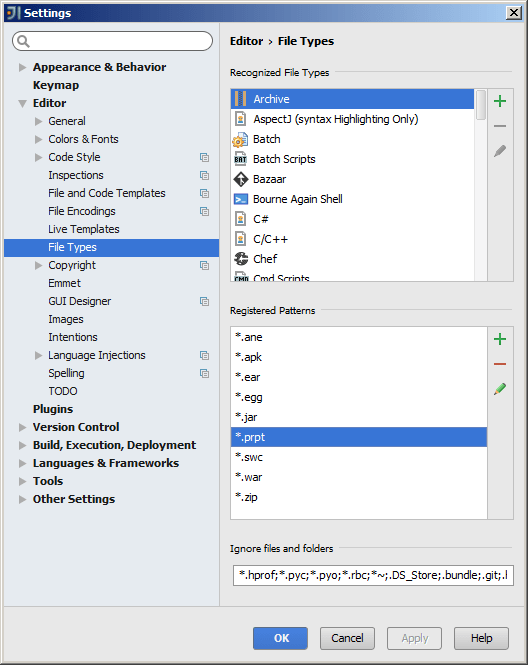
intellij_register-pentaho-prpt-as-archive-file-type

Configure Intellij to use default Eclipse Java import layout

Eclipse and Intellij use different default layouts of Java imports. If used on the same project, Eclipse’s “Organize Imports” will compete with Intellij’s “Optimize Imports“.

To avoid distracting back-and-forth code changes, Intellij can be configured to match the default Eclipse behavior:

Go to File – Settings – Editor – Code Style – Java – Imports tab

Prevent on-demand imports (i.e. wildcards) by settings high count limits:
intellij-java-imports-no-wildcards

Define the imports layout (i.e. grouping and order) like this:
intellij-java-imports-layout

Fix Eclipse installation after Cygwin unzip

I used Cygwin’s unzip on Windows 7 to unpack freshly downloaded Eclipse zip packages. When trying to start eclipse.exe, I was getting weird error messages:

For Luna (4.4):

eclipse-luna-error-after-cygwin-unzip

For Mars (4.5):

eclipse-mars-error-after-cygwin-unzip

It turned out that after unzipping, the executable permission was not set on ‘exe’ and ‘dll’ files, so I had to fix it like this:

find eclipse \( -name '*.dll' -or -name '*.exe' \) -exec chmod +x {} \;

JBoss Undertow is pulling me in … :o)

I am very impressed as I am trying out the various code examples for Undertow, a kick-ass, light-weight yet powerful, ultra-easy-to-embed HTTP and Java Servlet engine.

One of my side projects requires an embeddable yet feature-complete Java HTTP engine with low memory footprint and a simple straightforward API. I dismissed Tomcat, briefly considered Jetty, found Winstone too old and unmaintained, simpleframework not well-enough documented, vert.x and netty a little too much for my purposes and/or too complicated, so that a few weeks ago I had actually started to clone and refactor NanoHttpd.

The NanoHttpd refactoring was a great learning experience, but it certainly felt like I was reinventing the wheel in the form of a cute and mobile but slightly rusty foldable unicycle. ;o) – no offense please, nanohttpd developers

Then I found out about Undertow. The author Stuart Douglas is now officially my hero. What an awesome job he is doing! The server meets all of the above mentioned requirements and is apparently also comparatively fast. No wonder it is the HTTP engine used by Wildfly, the new JBoss AS.

Anyway, if you want to try yourself, I’d go with version 1.1 final at this time, i.e. this in your Maven pom.xml:

<dependency>
    <groupId>io.undertow</groupId>
    <artifactId>undertow-core</artifactId>
    <version>1.1.0.Final</version>
</dependency>

I decided to pretty much ignore the documentation section of the undertow.io website for now, as it is still for version 1.0 and the API has changed – improved, I guess – since then. It seems to me, that at this point the core code itself and the usage examples are the best documentation for version 1.1. Both are Maven modules of the undertow github project.

By the way, if you are wondering why the project has no issues section on github: The issue tracking is done in the JBoss Jira.

Show foreign keys in Oracle SQL Developer

The “Constraints” tab of a table in Oracle SQL Developer shows the foreign keys pointing from the table to other tables. But there is no list of foreign keys pointing from other tables to the table.

To display such a list, we can add a custom extension.

The following instructions are derived from a question/answer on stackoverflow. A big “Thank you” goes to user junaling whose solution I recount here:

Define the extension

Put the following into an XML file, e.g. “fk_ref.xml”:

<items>
    <item type="editor" node="TableNode" vertical="true">
    <title><![CDATA[FK References]]></title>
    <query>
        <sql>
            <![CDATA[select a.owner,
                            a.table_name,
                            a.constraint_name,
                            a.status
                     from   all_constraints a
                     where  a.constraint_type = 'R'
                            and exists(
                               select 1
                               from   all_constraints
                               where  constraint_name=a.r_constraint_name
                                      and constraint_type in ('P', 'U')
                                      and table_name = :OBJECT_NAME
                                      and owner = :OBJECT_OWNER)
                               order by table_name, constraint_name]]>
        </sql>
    </query>
    </item>
</items>

Add the extension

Add it to SQL Developer via menu:

Tools > Preferences – Database > User Defined Extensions – Click “Add Row” button – In Type choose “EDITOR”, Location is where you saved the xml file above – Click “Ok” then restart SQL Developer

Test it

Navigate to any table and you should now see an additional tab next to SQL one, labelled “FK References”, which displays the new FK information.

Design and code visualization

As a team lead at work and for my own good, I want to improve how I visualize system architecture, software design and code structure.

There seem to be at least two angles to this:

  • Show ideas
  • Show (software) reality

For me, ideas often develop top-down, starting from overview level, and require putting something I have in mind on paper or whiteboard, often as a mix of bullet points, sketchy diagram fragments, boxes, ad-hoc dividers and increasingly chaotic arrows.

In the past I have used scans of my paper scribblings or photos of whiteboards to capture the results. But of course, those “snapshots” are not very workable nor professional.

So for idea visualization, I need a flexible yet intuitive mindmapping and/or diagram tool. It should be easy to install or require no installation at all, stylistically appealing but clear, and of course be free/libre open source (i.e. no Visio, please).

I looked at tools like Dia, some online services like LucidChart, and other allegedly free alternatives, and have settled on Pencil Project for now. It is very basic, but seems to provide all I need for now. The cross-platform availability is excellent, it can even be installed as a Firefox extension.

On the other hand, depicting the reality of existing systems and code bases usually requires some sort of generation process that analyzes the real structure, e.g. a network layout, the content of a Java package, an Apache Camel route, etc. and turns it into a renderable file.

For Java source code, I found PlantUML quite interesting, with its javadoc integration and quick dependency diagram support.

I might follow up with more detailed posts about how I use the tools mentioned above. One aspect I have not looked into yet, is how I can embed the visualizations within AsciiDoc.

Java software engineering – reference resources

Official Java and JEE

Java Technology Reference

Java Standard Edition (JSE)

Java Enterprise Edition (JEE)

The official Java tutorials

The official JEE 7 tutorial

JEE 7 Technologies index

Java language spec and JVM spec

Java community

Oracle Java community

OpenJDK

Java Community Process (JCP)

Apache Commons

Apache.org Java projects

JBoss.org

Spring

Google Guava

Trending Java projects on github

JEE and Java web servers

Apache Tomcat

JBoss Wildfly

Glassfish

Build and test automation

Sonatype Maven books

Jenkins documentation (wiki)

JUnit reference documentation

Source and version control

The SVN reference book

Git reference documentation

Java IDEs

Intellij IDEA documentation

Eclipse documentation

Netbeans knowledge base

Vim configuration for Java coding

Java remote debugging JVM options

Java 5, 6, 7 and newer

The Java™ Platform Debugger Architecture (JPDA) supports certain JVM invocation options.

Usually this boils down to:

-agentlib:jdwp=transport=dt_socket,server=y,suspend=y

This will cause your JVM process to execute but wait (suspend=y) and listen for a socket connection from a remote debugging client on a free port (which it will write to stdout. The suspend=y option is especially useful if you need to debug code that runs during the start-up phase of your application.

If you don’t want the process to do the initial waiting, then use suspend=n.

Java 1.4

If you are for some terrible reason stuck on Java 1.4, then you must use the older approach like this:

-Xdebug -Xrunjdwp:transport=dt_socket,server=y,suspend=n

Tomcat

To enabled remote debugging for a Apache Tomcat on Windows, create bin\setenv.bat in your Tomcat installation, with this content:

set "CATALINA_OPTS=-agentlib:jdwp=transport=dt_socket,server=y,suspend=n"

Network port

If you use the settings above, i.e. server=y and no “address” option, JPDA will pick a free port and write a message about this to stdout. Look for something like this:

Listening for transport dt_socket at address: [PORT]

Intellij configuration

Add a debug configuration via Run menu:

My first ~/.vimrc

I recently progressed from “the little vim-avoider who would if he only could” level to someone who actually edits his ~/.vimrc sometimes. So now I don’t want to forget the little I have learned and post it here:

" pointless reminder how i fixed vim issues on cygwin 
" existence of ~/.vimrc already triggers nocompatible mode
set nocompatible

" highlight all search pattern matches
set hlsearch

" i use light or even white background, vim to use readable colors
set bg=light

" use syntax highlighting
syntax on

Create single copyright holder, GPL licensed source code repository

I sometimes want to create a source code repository and build process for a GPL licensed software project, where the sole copyright holder (“owner”) is a single legal entity, like a company or a foundation.

This is how I do it:

  • Link to the license from README.md (e.g. the Free Software Foundation’s GPL, version 2)
  • At top of each source file: Copyright notice, license statement, warranty disclaimer
  • Include a plain-text copy of the full license in the root of your distributable package(s)
  • In the README.md, indicate that the project mandates copyright assignment
  • Define the legal agreement process between code contributors and the project owner

The GPL was chosen for its strong copyleft nature and combined with the sole copyright holder approach to enable dual licensing business models.

On sites like github, the code contribution itself is usually done by pull request. The legal agreement process between code contributor and project owner should be complete before the pull request is accepted.

I am not yet sure how to best automate updating the year range in the copyright notice, probably at commit time.