Add youtube to Firefox “One-Click Search Engines”

Install this extension: https://addons.mozilla.org/en-US/firefox/addon/youtube-opensearch-engine/

Background Info

The underlying standard is OpenSearch.

This is what I downloaded from https://youtube.com/opensearch :

<?xml version="1.0" encoding="UTF-8"?>
<OpenSearchDescription xmlns="http://a9.com/-/spec/opensearch/1.1/">

<ShortName>YouTube</ShortName>
<Description>Search YouTube</Description>
<Tags>youtube video</Tags>
<Image height="16" width="16" type="image/vnd.microsoft.icon">https://www.youtube.com/favicon.ico</Image>
<Url type="text/html" template="https://www.youtube.com/results?search_query={searchTerms}&amp;page={startPage?}&amp;utm_source=opensearch"></Url>
<Query role="example" searchTerms="cat"></Query>

</OpenSearchDescription>
Firefox ESR 91 now in Debian stable

Until yesterday Debian “stable” came with Firefox ESR 78, a browser that has been unsupported by Mozilla since October 5, 2021. This lead to concerned discussions.

Now it was finally replaced by Firefox ESR 91, along with a security advisory urging users to upgrade, listing no fewer than 17 Common Vulnerabilities and Exposures (CVEs).

The delay was apparently due to toolchain issues with rustc, a compiler required to build Firefox from source code. Kudos to the package maintainers who worked hard to resolve these problems, which is tracked here!

I upgraded tonight:

$ sudo apt update; sudo apt upgrade
[..]
Get:1 http://security.debian.org/debian-security bullseye-security/main amd64 firefox-esr amd64 91.4.1esr-1~deb11u1 [58.7 MB]
[..]
Unpacking firefox-esr (91.4.1esr-1~deb11u1) over (78.15.0esr-1~deb11u1) ...
[..]
Setting up firefox-esr (91.4.1esr-1~deb11u1) ...

Besides the security fixes it looks like Mozilla has once again opted for further flattening the appearance of UI elements.

What else is new: https://www.mozilla.org/en-US/firefox/91.0esr/releasenotes/

Webex web client in Firefox could not acquire local media

If you run Webex Teams – i.e. http://teams.webex.com – in Firefox and join a video meeting, you might see the error

Could not acquire local media. Please check your settings.

This probably means that support for the H264 video format is missing.

Go to “about:config” and search for

media.gmp-gmpopenh264.enabled

and set it to “true”.

Restart Firefox, and go to “about:addons”, click “Plugins”.

The plugin “OpenH264 Video Codec provided by Cisco Systems, Inc.” should now be installed, and video calls in the Webex web client should now work.

Server folder as photo gallery in web browser

I wanted to make image folders on our family file server browseable and provide convenient image gallery features like index view, slideshow, etc.

The file server is on our home network and runs Debian GNU/Linux.

I installed webfs, configured it to use port 80 (instead of its default port 8000), added a symbolic link to the root folder of the image folders that I wanted to make browseable (/opt/data in my case) and restarted webfsd:

sudo apt install webfs
sudo sed 's/web_port=.*/web_port="80"/' -i /etc/webfsd.conf
sudo sed 's/web_root=.*/web_root="/var/www/html"' -i /etc/webfsd.conf
sudo sed 's/web_index=.*/web_index="index.html"/' -i /etc/webfsd.conf
sudo ln -s /opt/data /var/www/html
sudo service webfs restart

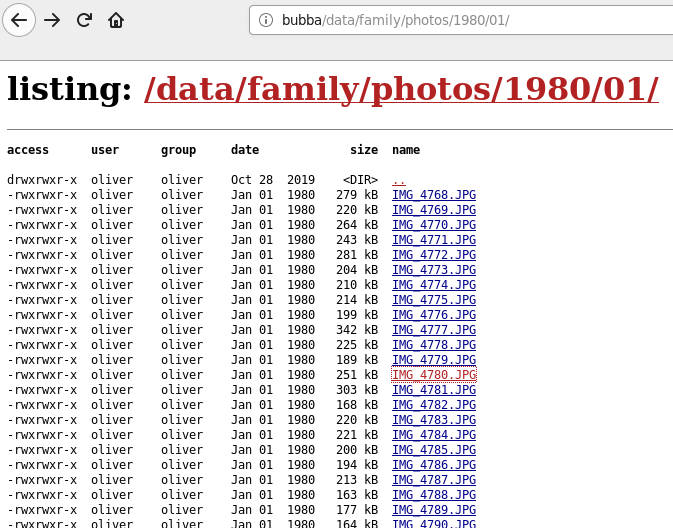
The name of the server is “bubba” and at this point pointing a web browser to http://bubba/ already worked, but it only showed a simple listing of file names like this:

Next I installed the Slideshow Firefox add-on on all our computers, and now the image folder is presented like this:

Mission accomplished! 😀

Testing HTML5 / CSS3 editor BlueGriffon

I used to use the now-outdated Mozilla based editor Kompozer, which was a bug-fix fork of Nvu.

Today I realized that in the meantime (since 2015) the Nvu author Daniel Glazman has developed BlueGriffon, an Open Source next-generation Web Editor based on the current rendering engine of Firefox.

I just installed it on Windows at work and my Debian laptop at home and plan to give it a try.

If it is easy to use and generates clean standards-compliant code, I might use it for Web UI mock-ups and other prototyping. :)

How I manage my website logins (using Firefox)

This blog post describes how I manage my many website logins (usernames, passwords). I am very interested in how I can improve my current approach. I want it to be highly secure and highly convenient. Please feel free to add your comments and suggestions!

I try to use secure passwords for all of my web accounts, i.e. long random combinations of “special characters”, mixed case letters and numbers. They are usually so secure that I definitely cannot remember them.

So I let my web browser remember, manage and auto-fill my website logins. I use

The approach works well and I never have to memorize my passwords. But my worries are:

  • Is Firefox Sync data as secure as Mozilla claims it is?
  • What can happen if malicious hackers gain access to the Firefox Sync servers?
  • Is the Triple-DES encryption with cipher block chaining that is allegedly used for local password storage in the Firefox profile secure enough (especially given this long-standing bug)?
  • Is it a bad idea to let Firefox even remember my online banking, Paypal and other sensitive passwords?

My standard tools on a Windows workstation

If I have to work on a Windows machine, these are the tools I usually install and use:

Free/Libre/Open Source

Free/Libre/Open Source software (“FLOSS”) with OSI certified Open Source license

Cross-platform:

  • Latest JDK
  • Intellij (Community Edition)
  • 7zip
  • Eclipse (Platform Runtime Binary + plugins required for my work)
  • Apache Tomcat
  • Apache Maven
  • Git (from git-scm.org)
  • Cygwin (with openssh, wget, nano)
  • Firefox (with Adblock, Secure Login, Firebug, Uppity)
  • Filezilla
  • LibreOffice
  • Pidgin
  • Gimp
  • Gvim
  • Wireshark
  • OpenVPN

Windows-only:

  • Notepad++
  • PdfCreator
  • Infrarecorder
  • CamStudio
  • Link Shell Extension

Closed source

Binaries currently available for download without license fees:

  • Adobe Reader
  • Sysinternals
  • Deskpins
  • MWSnap

Set Firefox “New Tab” page back to about:blank

Recent Firefox versions show a fancy “top sites” overview page every time the user opens a new (empty) tab. This is supposed to allow quick navigation to your most often visited sites.

If you (like me) don’t like the lag (and related security issues) that this adds to opening new tabs then set the new tab behavior back to showing a blank page:

  • Open “about:config” in the address bar
  • Acknowledge the warning to be careful
  • Search for “browser.newtab.url”
  • Right-click, Modify
  • Change the value from “about:newtab” to “about:blank”

Only after writing this blog post, I noticed that there is a Firefox help page that explains the same procedure.

Tested old-o.github.io on all major browsers

I just tested my personal “résumé” – British folks would say “CV” – website at old-o.github.io successfully on IE8, IE9, Firefox 3.6 to 9, latest and older Chrome versions, Opera 10 and 11 and Safari 4 and 5.1. It works on all browsers and looks fine.

You might wonder if I have all these browser installed? No, I don’t. I used the amazing browserling.com service that runs all the various browsers in virtual machines “in the cloud”, and embeds the UI in their website. Cool stuff and currently free for everyone to use!

One caveat with browserling.com is a tool called IETester that they use to emulate the ancient IE5.5 and IE6 browsers. Its seems to have bugs related to PNG graphics which prevented reliable testing. So if anyone out there still uses IE5.5 or IE6: Please visit old-o.github.io and let me know if you can see the photo of me on the page with the transparency effect.

On the newer CSS3 capable browsers, my site now sports drop shadows and rounded corners, using border-radius and box-shadow.

I also tested W3C standards compliance (HTML5, CSS3) and all my pages did pass those tests as well, except for some stuff caused by bugs in the CSS3 validator at w3.org. What a nice way to end the computer oriented part of the day …