
My employer uses a Cisco AnyConnect VPN.
Today I set up my Debian GNU/Linux 10 (“buster”) to connect to it, using only Open Source components.
My setup:
- XFCE desktop
- network-manager
- openconnect
To install the required packages:
sudo apt install openconnect network-manager-openconnect-gnome network-manager-gnome curl xmlstarlet
The curl and xmlstarlet packages are used by csd-post.sh, a Cisco Anyconnect CSD wrapper script included with OpenConnect.
Debian 10 by default demands at least TLS 1.3 which caused this error:
error:1425F102:SSL routines:ssl_choose_client_version:unsupported protocol
I fixed it by creating a more relaxed openssl configuration:
sudo cp /etc/ssl/openssl.cnf /etc/ssl/openssl_tls_1_0.cnf

sudo vi /etc/ssl/openssl_tls_1_0.cnf
Change only the “MinProtocol” line towards the end of the file to
MinProtocol = TLSv1.0
Then add a helper script /usr/local/bin/csd-post-tls-1-0.sh to use the relaxed config:
#!/bin/bash

export OPENSSL_CONF="/etc/ssl/openssl_tls_1_0.cnf"

/usr/libexec/openconnect/csd-post.sh "$@"
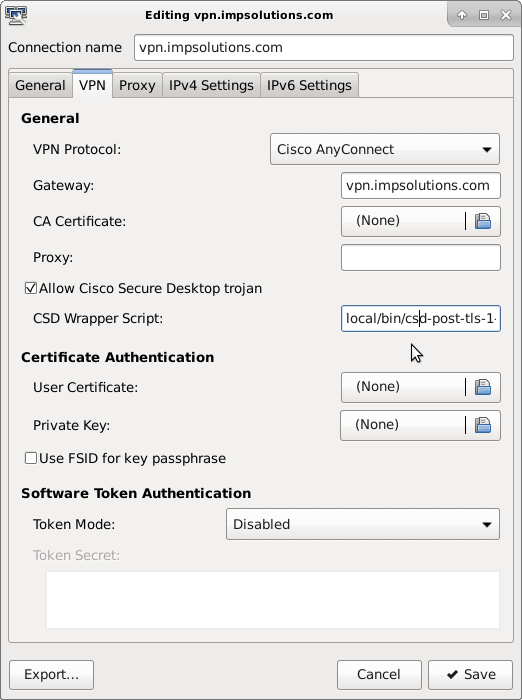
Then configure your VPN connection through the network-manager applet (you might have to logout/login to let XFCE autostart the systray applet):


Check “Allow Cisco Secure Desktop trojan” and as “CSD Wrapper Script” use /usr/local/bin/csd-post-tls-1-0.sh :
And finally connect:

 Oleander Donovan's IT blog